Website content
Website content is a table of texts per language that a website reads from the API. Editors change it here, and the website picks it up without a deploy. Open Websites, choose a website and go to the Content tab.
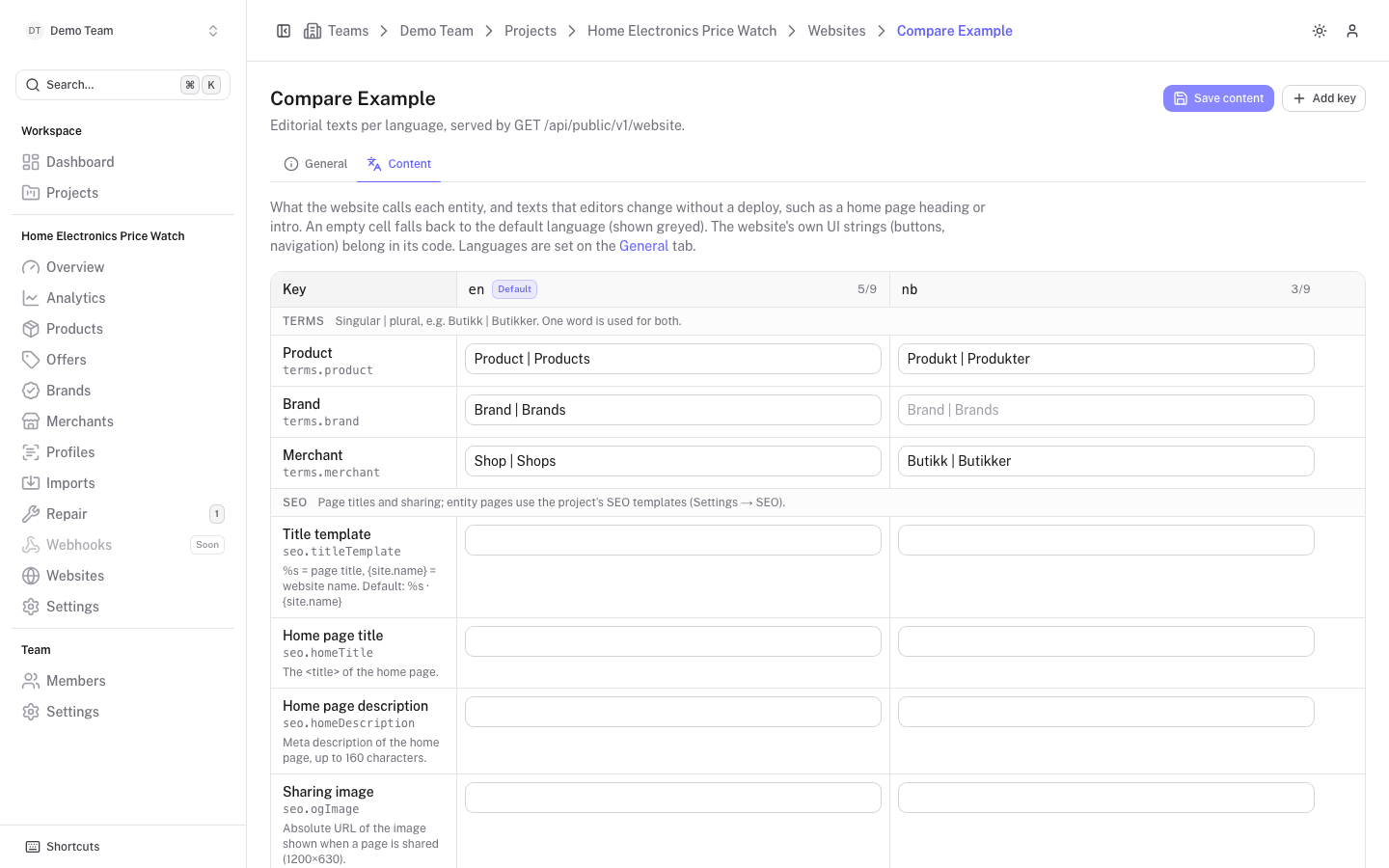
Each column is a language the website serves (the default is marked Default), and the number next to it shows how many keys have a text in that language. Languages are set on the General tab. Only owners and admins can edit; everyone else sees the table read-only.
The website receives the content from GET /website as terms, seo and translations. See the public API.
Terms
What the website calls each entity. There are three fixed keys:
| Key | Entity |
|---|---|
terms.product | Product |
terms.brand | Brand |
terms.merchant | Merchant |
Write the singular and plural separated by a bar, for example Butikk | Butikker. A single word is used for both.
SEO
Site-wide texts for page titles and sharing:
| Key | Field | Notes |
|---|---|---|
seo.titleTemplate | Title template | Wraps every page title. %s is the page title and {site.name} the website name. Default: %s · {site.name}. |
seo.homeTitle | Home page title | The title of the home page. |
seo.homeDescription | Home page description | Meta description of the home page, up to 160 characters. |
seo.ogImage | Sharing image | Absolute URL of the image shown when a page is shared (1200 by 630). |
The titles and descriptions of brand, merchant and product pages come from the project's SEO templates or from the entity's own SEO fields.
Texts
Free key and value pairs for anything editors should control, such as a home page heading or intro. Click Add key, type a key such as home.title in the first column, and fill in the text for each language. The trash button removes a row.
- Keys must be unique.
- Keys starting with
terms.orseo.are reserved for the rows above and cannot be used for free texts. - A cell left empty is not stored.
Click Save content to save all languages at once. The button is enabled once you have changed something.
Fallback between languages
An empty cell is not an error: the website gets the nearest text that exists. For a language such as nb-NO the lookup order is the language itself (nb-NO), then its base language (nb), then the website's default locale, then the default's base language. A text that is missing everywhere is simply not returned. In the table, an empty cell shows the text it will fall back to as a greyed placeholder.
Languages without a website
If a language has content but the website no longer serves it, a warning appears above the table. Add the language again on the General tab to serve it, or use Delete content to remove its texts permanently.