Analytics
Two pages tell you how a project is doing. Overview is a quick health check you open every day. Analytics goes deeper, over a time range you choose. Both are in the project sidebar.
Overview
The Overview page is the project's front page. It opens with the project's important note (shown in red when set) and internal note, then:
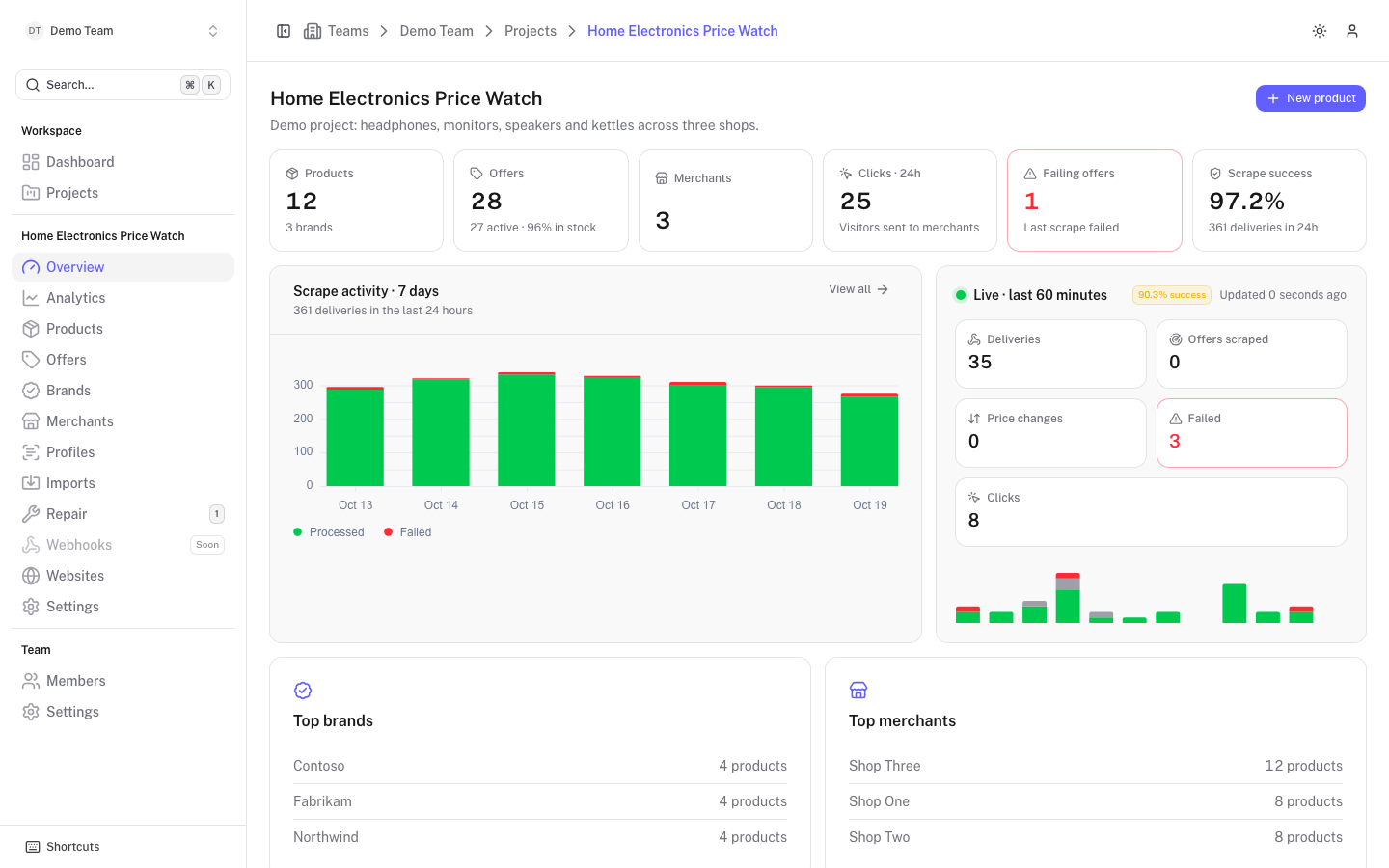
Six stat cards, each linking to the page behind it:
| Card | Shows |
|---|---|
| Products | Number of products, with the number of brands. |
| Offers | Number of offers, with how many are active and the share in stock. |
| Merchants | Number of merchants. |
| Clicks · 24h | Visitors sent to merchants in the last 24 hours. |
| Failing offers | Offers whose last scrape failed. Red when above zero; click it to open the failing offers. |
| Scrape success | Share of successful webhook deliveries in the last 24 hours, with the number of deliveries. |
Scrape activity · 7 days is a bar chart of processed and failed deliveries per day, with the number of deliveries in the last 24 hours. Click View all to open Analytics.
Live · last 60 minutes shows deliveries, offers scraped, price changes, failed deliveries and clicks of the last hour, with a small chart and the success rate. It refreshes by itself.
Top brands and Top merchants list the biggest ones by number of products. Newest products lists the most recently added products with their lowest price.
Owners, admins and members with write access also get a New product button.
Analytics
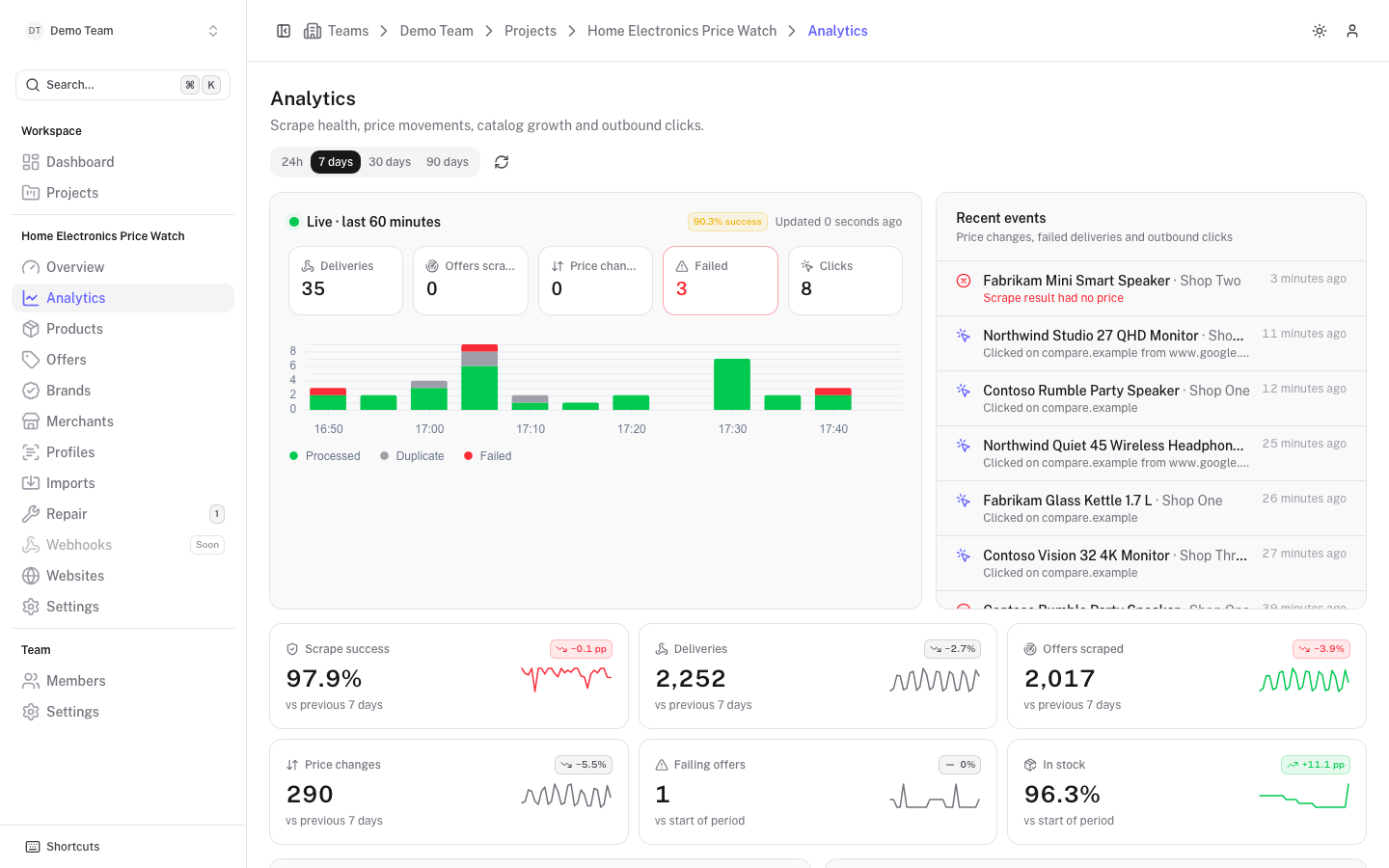
Open Analytics and choose a range at the top: 24h, 7 days, 30 days or 90 days. The refresh button reloads the data. Numbers are compared with the previous period of the same length.
Live and recent events
The Live · last 60 minutes panel is the same as on the Overview. Recent events lists price changes, failed deliveries and outbound clicks as they happen, each with the product, merchant and a short description such as "Scrape result had no price" or "Clicked on compare.example".
Key figures
Six cards show the value for the range, the change against the previous period and a small trend line:
| Card | Meaning |
|---|---|
| Scrape success | Share of webhook deliveries that were processed. |
| Deliveries | Webhook deliveries received from Scrape Admin. |
| Offers scraped | Offers that received a new scrape result. |
| Price changes | Price changes detected. |
| Failing offers | Offers whose last scrape failed, compared with the start of the period. Click to open them. |
| In stock | Share of active offers in stock, compared with the start of the period. |
Charts
- Scrape throughput: processed and failed deliveries over time.
- Offer issues: failing, stale and never-scraped offers over time.
- Price movements: price drops and increases detected.
- Stock availability: share of active offers in stock.
- Catalog: products and active offers over time, which shows the catalogue growing.
- Failure causes: why failing offers fail right now, grouped by HTTP status or error text. Click the title to open the failing offers.
Outbound clicks
Shows the total clicks against the previous period, a chart of clicks over time, and three top lists: Most clicked products, Most clicked merchants and Clicks per website. Clicks are recorded when visitors follow the tracked links of your websites. See Click tracking.
Merchant health
A table per merchant with a Health bar (the share of active offers that are neither failing nor stale), and the counts of Active, Failing, Stale and In stock offers, Deliveries and the Last run. Click a number to open the matching offers, filtered by merchant.
Biggest price drops and increases
Two lists show the offers whose price moved most in the range, so you can check that large changes are real and not a scrape mistake.