Wrong URL flow
The wrong URL flow takes the offers of the Wrong URL / 404 queue one at a time. For each offer you look the product up at the merchant, then either save the URL where you found it or mark the offer as gone. It is designed to be fast: the product name is copied for you and the merchant's search opens in a new tab.
Start it from Repair with Start flow, or click a row in the queue to start at that offer. You need write access to the project. See Repair queues for the queue itself.
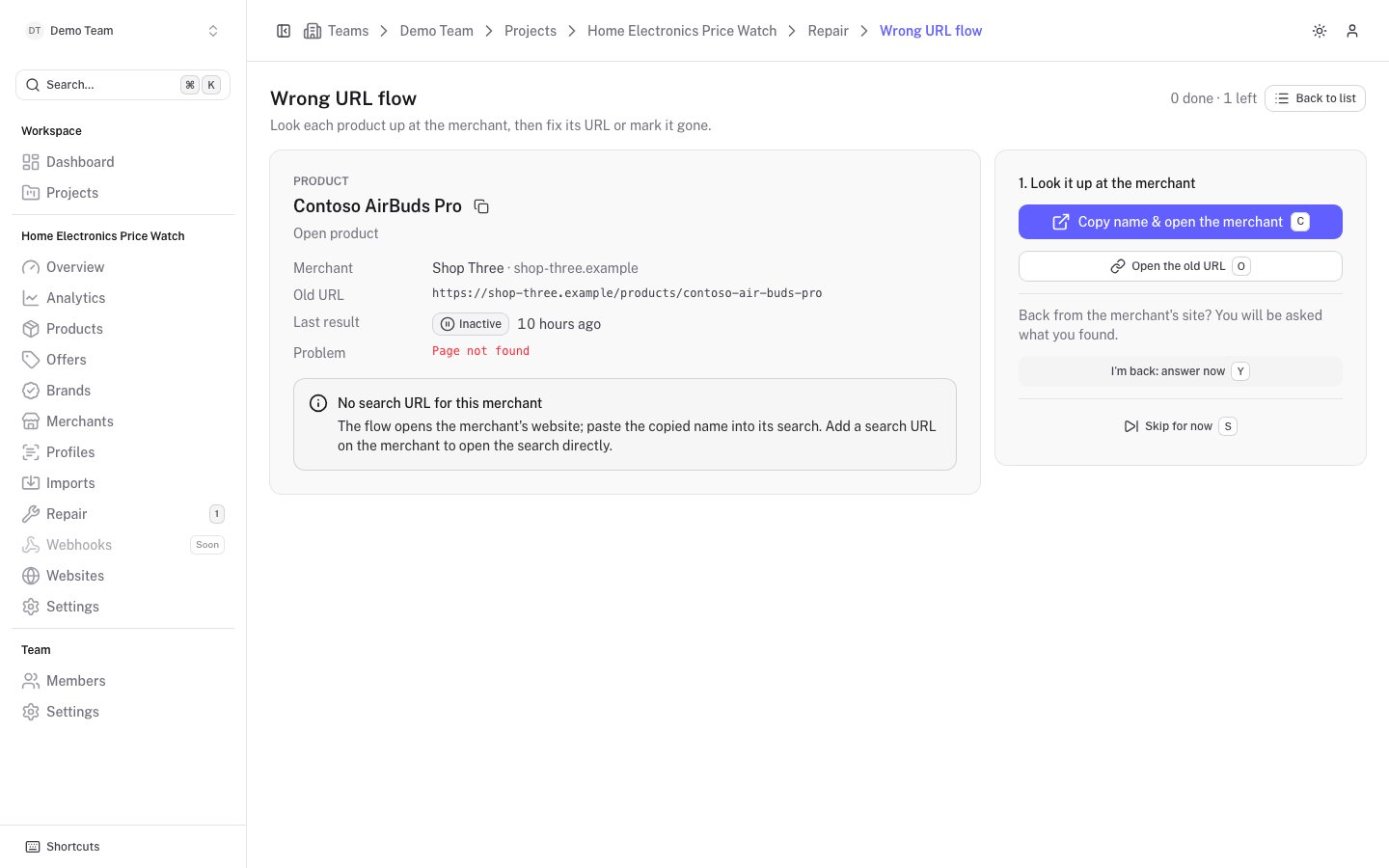
The offer card
The left side shows the offer you are working on: the product name (with its brand), a link to Open product, the Merchant, the Old URL, the Last result with its status, and the Problem (for example "Page not found"). A counter at the top right shows how many offers are done and how many are left.
Fix an offer
Look it up at the merchant
Click Copy name & search the merchant. The product name is copied to your clipboard and the merchant's search opens in a new tab.
If the merchant has no search URL, the button reads Copy name & open the merchant and opens the merchant's website; paste the name into its search. Add a search URL on the merchant to open the search directly. See Merchants.
You can also click Open the old URL to see what the old address does now.
Come back and answer
When you return to the platform tab you are asked what you found. You can also click I'm back: answer now.
Save the new URL or mark it gone
If you found the product, paste its address in Yes, it is at: (the paste button reads it from your clipboard) and click Save the new URL. The offer gets the new URL, is activated and a scrape of the new URL starts when the project is connected to Scrape Admin.
If the merchant no longer sells it, click No, it is not sold any more. The offer is paused, marked gone and moved to the Gone queue with its price history intact.
Use Look again to go back to step 1.
The new URL is checked before it is saved:
- It must be a valid URL on the merchant's website host. If it is on another host, move the offer to another merchant from the offer's page instead.
- It cannot be the old URL that answered 404.
- It cannot be the URL of another offer.
Skip and finish
Skip for now moves to the next offer without changing anything. Skipped offers stay in the queue and are passed over until you reload the page. When nothing but skipped offers are left, Go through the skipped ones brings them back. When the queue is empty you see "No broken URLs left." and a link back to Repair.
Keyboard shortcuts
| Key | Action |
|---|---|
C | Copy the name and search the merchant |
O | Open the old URL |
Y | Go to the answer step |
N | Mark the offer gone |
S | Skip for now |
Esc | Back one step, or back to the Repair list |